PhoneSearch v1.8
last update: 2nd Febuary 2008
Latest
Documentation
/ zip
/ sit
| Database name: | PhoneSearch |
| Database Creator: | PhSe |
| Database Type: | appl |
| Size: | 28 KB |
| Type: | Shareware |
latest changes:
2004-12-18 v1.8enhancement
5-waynav enabled
fixed
Fatal Exeption/ Reset in search for country
Most of the screenshots are reduced to b/w images to save bandwidth.
 |
Did you ever tried to find a phone number in your Address App ?
I have writen down the number in a grouping, so that they are easier to rember e.g. 0179 - 12 11 87 70. If you use the global find you have to remeber the exact writing including spaces and other characters like / or -. PhoneSearch will do that for you.
|
|
This Palm Application searches in the Contacts (AddressDB.pdb) for the given phone number. It searchs within all five phone fields, regardless what type (private, office, mail other etc.).
The Application is integrated in the global find.
|
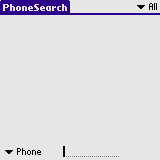 |
As long as no search string is entered, the list is empty.
|
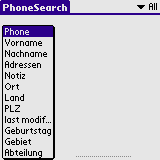 |
You can select via the popup trigger which field should match the string you entered. The name of the labels are localized to your PalmOS version. The screenshot is created with a german version of PalmOS.
|
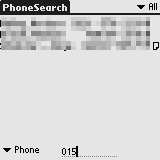 |
If searching for a phone number the application removes all charakters that are no numbers and changes alphabetic characters by the appropiate vannity value (A, B and C becomes a 2, D, E and F becomes a 3 and so on...). So if you search for the number above you have to enter simply 17912118770. While you are typing the list is refreshed.
|
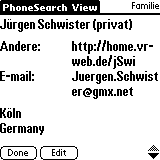 |
If you select a record from the list, this panel will advance. You can see the details of the Address. Hitting the Edit button, the build-in Address Application is called. To get back to the PhoneSearch Application you have to use the launcher (it is a one-way).
|
 |
This is how it looks like, if you hit the Edit button. The selected record in PhoneSearch will be shown up in the Address Application. You do not have to search again.
|
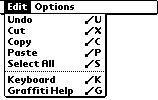 |
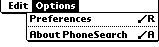
Available menues.
|
 | |
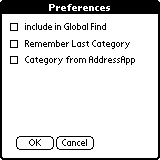 |
On the Preferences Panel you can choose, if PhoneSearch will respond to the Global find of the build in Find function of PalmOS™ or not.
If you like to remember PhoneSearch the last selected Category check the appropiate checkbox. PhoneSearch can use the last Category from the Address App if wanted and available.
|
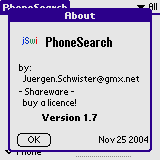 |
The about panel
|
Don't forget to backup your data before using it.
Before using that piece of software make a complete backup of you device (and make sure that the restore will work !). I prefer pilot-xfer or SmartBackup for that job.
Altough i am quite carefull, there might be a bug.
Tested on Palm OS 3.5 through 5.x. Color Devices are supported..
This Software is Shareware. You have to buy a License to use it. If you register you will recieve the latest version with the latest enhancements as via eMail. You will recieve further updates via eMail.
The latest version is only available for registered user.
A Licence can be bought from Palmgear (
 ).
).
If you like to buy a licence via the German distributor PDAssi klick
here.
Refer to the Document for the Lisence Agreement.
Any distribution of that Software via CD-ROM, Internet or other media without the permission of the author is not allowed.
These applications are distributed as archives files. To extract the original files from an archive, you can use WinZip (.zip) for Windows or StuffIt Expander (.sit) for Macs.
Have a look at that documentation if you don not know how to install the Application. on your PalmOS enabled device.
Any comments are appreciated.
Kind regards
Juergen Schwister
wish list
-
speed up the search since version 1.2
-
support for pageup/down
-
display a progress bar during search since v1.3
-
Preferences panel for:
which fields are included in the search
Known bugs
- -none- (so report some, if you find them. Thanks to all who already did it)
Attention! The latest version is only available for registered users. It is not available via download.History
2004-12-18 v1.8enhancement
5-waynav enabled
fixed
Fatal Exeption/ Reset in search for country
2004-11-25 v1.7enhancement
Lookup in field Custom1 to custom4 is now available
fixed
high-res icons cleaned up
2003-10-04 v1.6enhancement
Lookup in City, Land and Zip Code is now possible
fixed
list is cleared if the search type is changed
2003-10-04 v1.6enhancement
Lookup in City, Land and Zip Code is now possible
fixed
list is cleared if the search type is changed
2003-xx-xx v1.5cfixed
small launcher color icon is now transparent
complete list of versions
by
Jürgen Schwister @ http://www.jSwi.de