PhoneBeam v1.51
last update: 2nd Febuary 2008
Latest
Documentation
/ zip
/ sit
| Database name: | PhoneBeam |
| Database Creator: | PhBe |
| Database Type: | appl |
| Size: | 27 KB |
| Type: | Commercial |
latest changes:
2006-08-31 v1.51enhancement
New option "merge to name". The Name inside the vCard is set corresponding to the NamePreferences.
fixed
switching from single to mulitple beam and vice versa works now without leaving the app and relaunch.
Most of the screenshots are reduced to b/w images to save bandwidth.
 |
Do your CellPhone do not support more than one Phonenumber per entry ? Do you want to beam only selected fields via irDA ?
If yes, here you have a little utility to solve that problem.
Beam each PhoneNumber of an address book entry to the Phone via IrDA with a different name for each Phonenumber (Fax,E-Mail, Mobil etc.) in one step.
If you only weant to beam selected fields via irDA here is the solution, without copying and editing the record in the address app.
|
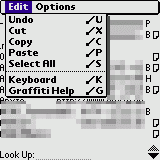 |
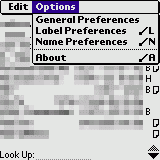
The available menus
|
 | |
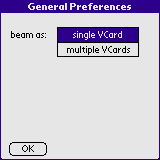 |
You can choose how the vCard should be send. Each phone number as single vCard or all phone numbers with one vCard. The option to send the address within one vCard is available only with devices with PalmOS 4.0 or better .
|
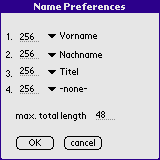 |
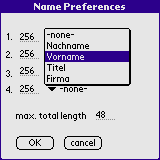
You can choose how the name of the vCard should be build. You can set a mximum lenth of each part. Only relvant if you send each phone field as a single vCard.
|
 |
The labels are localized to your language.
|
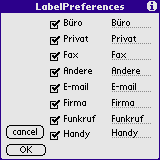 |
with the checkboxes you can select which entries should be beamed by default.
The editable field contains the suffix that is added to each name.
The length of the Name is limited to 13 chracters. The suffix is localized to the language of your PalmOS™ device you are using
|
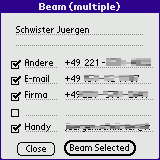 |
with the checkboxes you can select which phonenumber / entries will be beemed via irDA.
You can add any value by your self
|
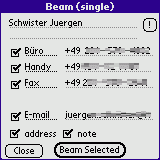 |
Only one vCard including all field will be send.
With the checkboxes you can select which phonenumbers / entries will be beamed via irDA.
You can edit the phone fields without changing the address record itself.
the unchecked fields will not be beamed.
|
 |
The about panel can be reached by short cut /A or via the menu.
|
Don't forget to backup your data before using it.
Before using that piece of software make a complete backup of you device (and make sure that the restore will work !). I prefer pilot-xfer or SmartBackup for that job.
Altough i am quite carefull, there might be a bug.
Tested on Palm OS 3.3, 3.4, 4.0 and 5.0.
This Software is Shareware. You have to buy a License to use it. If you register you will recieve the latest version with the latest enhancements as via eMail. You will recieve further updates via eMail.
The latest version is only available for registered user.
A Licence can be bought from Palmgear (
 ).
).
If you like to buy a licence via the German distributor PDAssi klick
here.
Refer to the Document for the Lisence Agreement.
Any distribution of that Software via CD-ROM, Internet or other media without the permission of the author is not allowed.
These applications are distributed as archives files. To extract the original files from an archive, you can use WinZip (.zip) for Windows or StuffIt Expander (.sit) for Macs.
Have a look at that documentation if you don not know how to install the Application. on your PalmOS enabled device.
Any comments are appreciated.
Kind regards
Juergen Schwister
wish list
-
Support for serial connection instead of irDA
-
make it compatible with pre PalmOS™ Version 3.5 since v1.1b
Known bugs
- -none- (so report some, if you find them. Thanks to all who already did it)
History
2006-08-31 v1.51enhancement
New option "merge to name". The Name inside the vCard is set corresponding to the NamePreferences.
fixed
switching from single to mulitple beam and vice versa works now without leaving the app and relaunch.
2004-10-09 v1.5enhancement
now you can edit the phone field before single beam.
2003-12-28 v1.4changed
changed to shareware
enhancement
choose between sending as single vCard or each Phonenumber as vCard
enhancement
in single vCard mode you can choose to attach the address and note
2003-11-24 v1.3fixed
if phone number conatain a @ it is send as EMAIL and not TEL;VOICE:
enhancement
Added grafity shift indicator on the Label and Name prefercens panel
enhancement
Color App Icon is now transparent.
enhancement
New name Preferences Panel.
2002-12-08 v1.2fixed
In the Name lable Preferences form, a field was drawn before the form is available. Caused a Error message in the PalmOS™ Emulator (POSE).
enhancement
In the Name label Preferences Panel added additional entries for First only and Last only
complete list of versions
by
Jürgen Schwister @ http://www.jSwi.de