MAClean v1.4
last update: 2nd Febuary 2008
Latest
Documentation
/ zip
/ sit
| Database name: | MAClean |
| Database Creator: | MACl |
| Database Type: | appl |
| Size: | 19 KB |
| Type: | Commercial |
latest changes:
2007-06-20 v1.4enhancement
Button to leave application
fixed
appl launch on card mount now works even if after the install of a new version
Most of the screenshots are reduced to b/w images to save bandwidth.
 |
MAClean is small Utility to delete the files created by MAC OS if a memory card is mounted as a drive.
It cleans up all the unused files on the Memory card that are not used by a PalmOS™ device. It keeps your memory card lean (Call it MAC-lean or MA-Clean).
|
Features:
- support for multiple slots ("target")
- selector for the memory card to clean up.
- RamDrive support for PalmOS 5™ (i do not know if it is possible to mount it with MAC™OS)
|
The following files and directories are deleted:
-
/AppleShare PDS in root
-
/FILEID.DAT in root
-
All the
.DS_Store in any directory including in the root directory
-
All hidden files starting with
._ in any directory including in the root directory
-
All the
FINDER.DAT in any directory including in the root directory
-
The whole
/Trash in the root
-
The whole
/.Trashes in the root
- The whole
/TheVolumeSettingsFolder in the root
- The whole
/Desktop Folder in the root
-
The whole
/Temporary Items in the root
-
The whole
RESOURCE.FRK directory including all files and sub directories
- The whole
/___Move&Rename in root
|
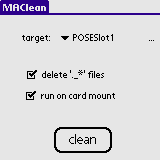 |
That is how the application look like if you start it from your favorite launcher.
|
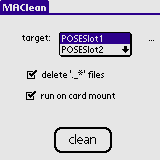 |
Select the Card you like to clean up. Most devices just support on Memory card at a time. Handera330 or some Sony Clie™ may list more than one card.
Select "delete '._*' files" to delete hidden files starting with >._<. Those files mess up some music player.
Choose "run on card mount" if MAClean should run when ever you insert a memory card in the slot of the PalmOS enabled device.
|
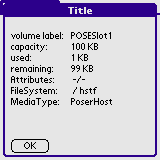 |
To get some more details about the choosen memory card, just press on the .... |
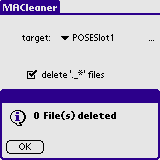 |
After you hit the "clean" button, the application starts to delete the above mentioned files. The process can be canceld at any time. Already processed files are deleted anyway. They will not be restored!
After the process is completed you get some further information about the number of files deleted.
|
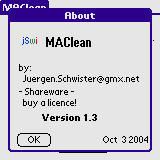 |
The about Screen of MAClean.
|
Don't forget to backup your data before using it.
Before using that piece of software make a complete backup of you device (and make sure that the restore will work !). I prefer pilot-xfer or SmartBackup for that job.
Altough i am quite carefull, there might be a bug.
Tested on Palm OS 3.3, 3.4, 4.0 and 5.0.
This Software is Shareware. You have to buy a License to use it. If you register you will recieve the latest version with the latest enhancements as via eMail. You will recieve further updates via eMail.
The latest version is only available for registered user.
A Licence can be bought from Palmgear (
 ).
).
If you like to buy a licence via the German distributor PDAssi klick
here.
Refer to the Document for the Lisence Agreement.
Any distribution of that Software via CD-ROM, Internet or other media without the permission of the author is not allowed.
These applications are distributed as archives files. To extract the original files from an archive, you can use WinZip (.zip) for Windows or StuffIt Expander (.sit) for Macs.
Have a look at that documentation if you don not know how to install the Application. on your PalmOS enabled device.
Any comments are appreciated.
Kind regards
Juergen Schwister
wish list
Known bugs
- if used with the PalmOS 5™ RAM Disk on Tungsten, a "genric file error" will pop up.
cancel button in the progress panel do not work.
History
2007-06-20 v1.4enhancement
Button to leave application
fixed
appl launch on card mount now works even if after the install of a new version
2004-10-03 v1.3enhancement
Feature "run on card mount" starts MAClean if a memory card is inserted. No need to start MAClean via launcher
2004-08-16 v1.2enhancement
all files with a name starting with ._ can be deleted too.
enhancement
window title changed from MACleaner to MAClean
2003-04-19 v1.1dchanged
from Freeware to Shareware.
2003-04-15 v1.1cenhancement
file .DS_Store is deleted in all sub directories too.
enhancement
directory RESOURCE.FRK is deleted in all sub directories too.
complete list of versions
by
Jürgen Schwister @ http://www.jSwi.de